

Every operations manager knows the frustration: timesheets that don’t add up, employees clocking in for absent colleagues, and the constant guessing game of who’s actually where during work hours. These aren’t minor inconveniences—they’re systemic problems that drain budgets, erode accountability, and leave managers flying blind when making critical staffing decisions. For medium-sized businesses managing teams across multiple locations, job sites, or flexible schedules, the lack of real-time workforce visibility creates a ripple effect that touches payroll accuracy, compliance, and overall productivity.
A mobile time clock app with GPS offers a fundamentally different approach to these entrenched challenges. By combining location verification with digital time tracking, this technology gives operations managers the precise data and control they need without adding administrative burden. In this article, we’ll explore how GPS-enabled time tracking works, how it enhances attendance accuracy, the steps to implement it effectively, and how complementary features like biometric verification and flexible scheduling capabilities can transform your operations from reactive to strategic. Let’s start with what makes GPS technology so powerful in this context.
Understanding the Power of GPS Technology in Modern Attendance Management
A mobile time clock app with GPS goes far beyond simply letting employees tap a button on their phones. At its core, this technology captures verified location data at the moment an employee clocks in or out, creating an indisputable record that ties time entries to specific physical coordinates. This means managers no longer rely on trust alone—they have objective proof of where work is happening.
Two distinct GPS capabilities drive this verification. Location stamping records the exact coordinates each time an employee punches in, creating a permanent audit trail attached to every time entry. Geofencing takes this further by establishing virtual boundaries around approved work locations—an office, a construction site, a client’s facility—and only allowing clock-ins when the employee is physically within that defined perimeter. Attempts to punch in from unauthorized locations are automatically flagged or blocked entirely.
This combination directly addresses the problems that plague distributed workforces. Remote employees can verify they’re working from approved locations without constant check-in calls. Field teams prove job site presence without supervisors physically confirming attendance. Time theft through early clock-ins from parking lots or nearby locations becomes impossible when geofences are properly configured. This GPS foundation doesn’t just fix attendance tracking—it creates the reliable data layer that enables smarter scheduling, accurate payroll, and genuine operational visibility across your entire organization.
Enhancing Attendance Management Accuracy and Accountability
When every clock-in carries verified GPS coordinates, the ambiguity that fuels payroll disputes simply disappears. Managers no longer need to reconcile conflicting accounts of when someone arrived or left—the system provides timestamped, location-verified records that speak for themselves. This precision in attendance management eliminates the rounding errors, manual entry mistakes, and estimated hours that typically inflate labor costs by three to five percent in organizations still relying on traditional methods.
From a compliance perspective, GPS-verified time records create an automated digital audit trail that satisfies labor law requirements without additional administrative effort. Whether facing a Department of Labor inquiry, a wage dispute, or an internal audit, managers can pull definitive records showing exactly when and where employees worked. This documentation proves invaluable for organizations subject to prevailing wage requirements on government contracts or those navigating complex overtime regulations across multiple jurisdictions.
Beyond resolving disputes, this level of transparency fundamentally shifts workplace culture. When employees know their attendance is objectively recorded, accountability becomes embedded in daily operations rather than enforced through confrontation. Honest employees appreciate that their punctuality and presence are accurately captured, while those inclined toward time theft lose their opportunity. Managers spend less time policing attendance and more time on strategic priorities—coaching teams, optimizing workflows, and responding to operational demands. The system handles verification automatically, transforming attendance management from a contentious supervisory burden into a seamless background process that everyone trusts.
Step-by-Step: Implementing a Robust Employee Punch-In System
Step 1: Selecting the Right App and Defining Geofences
Start by evaluating apps based on your operational complexity—consider how many locations you manage, whether teams are stationary or mobile, and what integrations you’ll need downstream. Once you’ve selected your platform, map out every approved work location and define geofence boundaries around each one. For office environments, a tight radius of 100-200 feet works well. Construction sites or large campuses may require broader perimeters. Client locations should be configured individually, and you’ll want the flexibility to add or modify zones as projects change without requiring technical support.
Step 2: Employee Onboarding and Policy Communication
Roll out the system with transparency at the forefront. Hold brief department-level training sessions demonstrating exactly how the app works—show employees what happens when they clock in, what data is captured, and what isn’t. Publish a clear written policy explaining that GPS data is only collected at punch-in and punch-out moments, not continuously throughout the day. Address privacy concerns directly and explain that the system protects honest workers by ensuring accurate pay for actual hours worked. Provide a two-week grace period where alerts are issued but no disciplinary action is taken for geofence violations.
Step 3: Integration with Payroll and Scheduling Systems
Connect your time clock app directly to your payroll software so verified hours flow automatically into pay calculations without manual re-entry. This eliminates transcription errors and reduces payroll processing time significantly. Map job codes, departments, and cost centers so that hours are categorized correctly from the moment they’re captured. Test the integration thoroughly with a single pay cycle before going fully live, verifying that overtime calculations, break deductions, and location-based pay differentials transfer accurately.
Step 4: Monitoring, Reporting, and Continuous Optimization
Once the system is running, use real-time dashboards to monitor attendance patterns across all locations simultaneously. Generate weekly reports highlighting late arrivals, missed punches, and overtime trends by department. Review geofence violation alerts to identify whether boundaries need adjustment or whether specific employees need coaching. After the first month, analyze the data to refine scheduling templates, identify understaffed shifts, and quantify the reduction in time discrepancies compared to your previous system. This ongoing optimization turns raw attendance data into actionable operational intelligence.
Going Beyond GPS: The Role of Biometric Technology for Ultimate Security
GPS confirms where a clock-in happens, but it cannot confirm who is actually holding the phone. This gap leaves the door open for buddy punching—one employee clocking in on behalf of another who hasn’t arrived. Biometric technology closes this vulnerability entirely by requiring unique physical verification at the moment of each punch. Facial recognition, the most practical mobile option, prompts employees to snap a quick selfie that the system matches against their stored profile using AI-powered comparison. Fingerprint scanning on device sensors offers an alternative for environments where camera use is impractical.
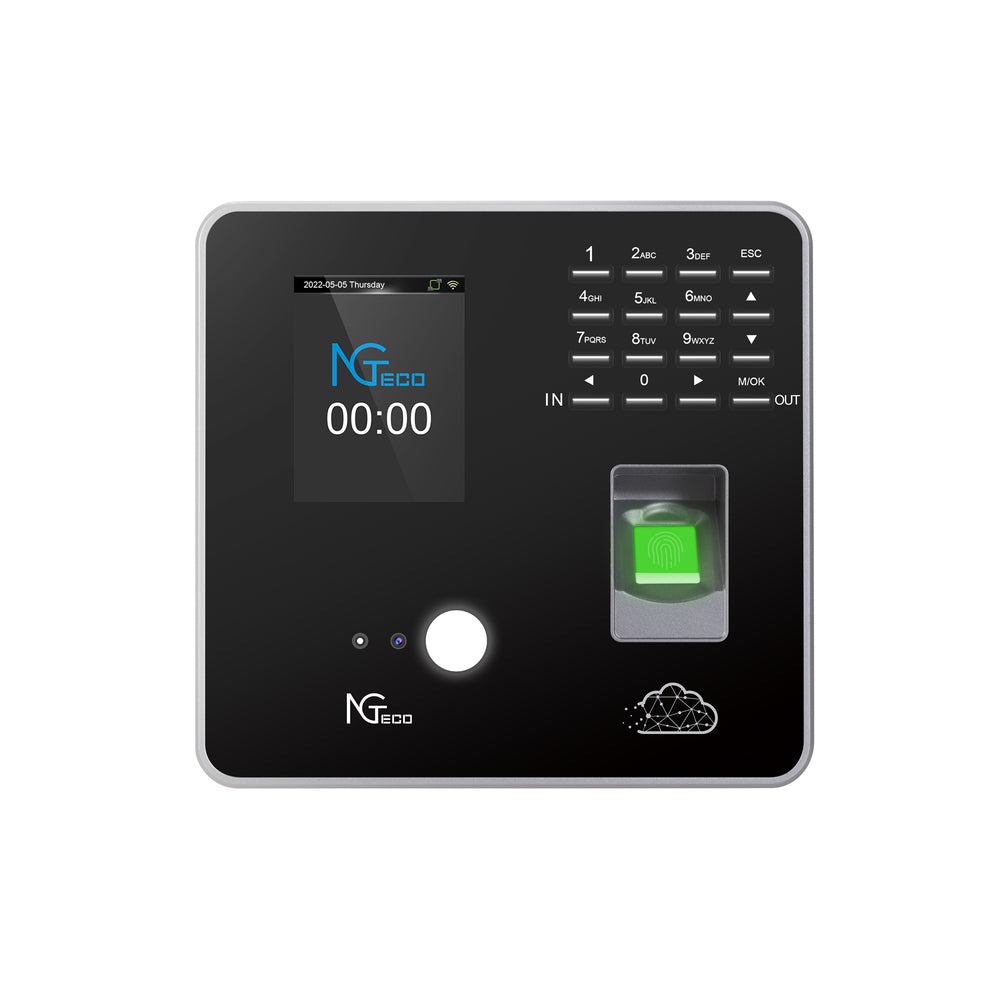
When GPS and biometrics work together, they create a verification system that answers both critical questions simultaneously: is this person where they should be, and are they who they claim to be? This dual-layer approach makes time fraud virtually impossible without requiring supervisor presence. Hardware providers like NGteco have developed biometric terminals that complement mobile solutions, offering fixed-location facial recognition devices for sites where dedicated clock-in stations are preferred alongside app-based tracking. Implementation requires enrolling each employee’s biometric template during onboarding—a process that takes under two minutes per person. Managers should communicate clearly that biometric data is encrypted, stored securely, and used exclusively for identity verification at punch events. Organizations operating in states with biometric privacy laws like Illinois or Texas need to obtain written consent and establish data retention policies before activation. The result is an employee punch-in system where every recorded hour is definitively tied to a verified individual at a verified location.
Addressing Core Needs: Flexible Scheduling and Department-Specific Tracking
Enabling Flexible Scheduling Options
Operations managers juggling multiple teams know that rigid schedules collapse under real-world pressure. A GPS-enabled time clock app transforms scheduling from a static document into a dynamic, responsive system. When an employee calls in sick at 5 AM, managers can push available shifts to qualified team members instantly through the app, and whoever accepts first gets the assignment confirmed with automatic notifications to everyone involved. Shift swaps between employees no longer require manager phone calls or email chains—workers submit swap requests through the app, managers approve with a single tap from anywhere, and the updated schedule syncs immediately across all devices.
For organizations with remote or hybrid workers, the app accommodates clock-ins from pre-approved home locations or rotating client sites without requiring schedule rebuilds. Managers gain the ability to create recurring templates for predictable weeks while retaining the flexibility to override individual shifts as demands change. Employees see their upcoming schedules, request time off, and pick up open shifts from their phones, reducing the back-and-forth communication that consumes supervisory time.
Providing Department-Specific Tracking Capabilities
Not every department operates the same way, and a one-size-fits-all approach to time tracking creates blind spots. A well-configured system allows managers to establish unique rules for each business unit. Field service teams might have multiple geofences across dozens of client locations with mileage tracking enabled, while retail staff operate within a single store perimeter with strict shift-start windows. Corporate departments might allow broader location flexibility but require project code entry at each punch.
This granularity extends to reporting and cost allocation. Managers can pull labor cost reports segmented by department, project, or location—revealing which teams are running over budget, where overtime concentrates, and how staffing levels correlate with output. A facilities management company, for example, can track hours per building contract separately, ensuring accurate client billing while identifying crews that consistently finish ahead of or behind schedule. These department-specific insights move workforce tracking from a blunt administrative tool into a precision instrument for operational decision-making, giving each manager visibility tailored to their unit’s unique demands and metrics.
The Tangible Benefits: How Improved Workforce Tracking Transforms Operations
When GPS verification, biometric security, flexible scheduling, and department-specific tracking work as an integrated system, the operational impact compounds far beyond fixing timesheets. Labor costs drop measurably as time theft disappears, overtime becomes visible before it spirals, and payroll runs on verified data rather than estimates. Compliance risk shrinks because every hour worked carries location-stamped, identity-verified documentation that withstands regulatory scrutiny without managers scrambling to reconstruct records after the fact.
Productivity gains emerge from two directions simultaneously. Managers reclaim hours previously spent chasing attendance issues, reconciling disputes, and manually processing time data—redirecting that energy toward coaching, planning, and problem-solving. Employees respond to the transparency with greater engagement because they see that accurate systems mean accurate pay, fair scheduling, and recognition of their actual contributions. The data flowing from these systems also fundamentally changes how decisions get made. Instead of relying on gut instinct about staffing levels or anecdotal reports about which crews perform best, managers access concrete metrics that reveal patterns, predict needs, and justify resource allocation. A mobile time clock app with GPS isn’t merely recording when people work—it’s generating the operational intelligence that transforms workforce management from a reactive administrative function into a strategic advantage that directly supports growth, efficiency, and competitive positioning.
Turning GPS-Enabled Time Tracking into a Strategic Operational Advantage
The challenges of inaccurate timekeeping, unverified attendance, and reactive scheduling don’t have to remain permanent fixtures of operations management. A mobile time clock app with GPS fundamentally reshapes how medium-sized businesses track, verify, and optimize their workforce—replacing guesswork with precision and administrative burden with automation. The technology addresses multiple operational pain points simultaneously: GPS verification and geofencing ensure accurate attendance management tied to confirmed locations, biometric identity verification eliminates buddy punching and time fraud at its source, flexible scheduling tools keep teams agile when real-world demands shift unexpectedly, and department-specific tracking delivers the granular insights each business unit needs to perform at its best.
Together, these capabilities transform workforce management from a cost center into a strategic function that drives measurable results—lower labor costs, stronger compliance posture, higher productivity, and a workplace culture built on transparency and fairness. For operations managers ready to move beyond spreadsheets and honor-system timesheets, adopting GPS-enabled time tracking isn’t just an incremental upgrade. It’s the foundation for scalable growth, tighter operational control, and a competitive edge that compounds with every accurately tracked hour across your organization.
