

Choosing a gaming monitor in 2026 means navigating more panel types, refresh rates, and resolution options than ever. The three specs that matter most are resolution, refresh rate, and panel type—get those right for your GPU and the games you play, and the rest is fine-tuning. This guide breaks down every spec so you can buy with confidence.
How Sharp Do You Actually Need? (Resolution)
Match your resolution to your graphics card. A monitor can display 4K, but if your GPU only pushes 60 fps at that resolution, you are paying for pixels you cannot fully use.
1080p (Full HD) remains viable for competitive FPS players who prioritize frame rate over pixel density. Paired with a mid-range GPU, it easily reaches 240+ fps in titles like Valorant and CS2. 1440p (QHD) is the 2026 sweet spot—visibly sharper than 1080p without the GPU demands of 4K. Most modern GPUs (RTX 4070-class and above) handle 1440p at 144+ fps comfortably. 4K (UHD) suits cinematic single-player games where visual fidelity outweighs raw frame rate, but requires a high-end GPU (RTX 4080-class or above) to stay above 60 fps.[1] Ultrawide (3440×1440 or 5120×1440) adds horizontal field of view for racing sims, RPGs, and productivity crossover. The trade-off is higher GPU load and limited competitive esports support.
How Fast Does Your Monitor Need to Be? (Refresh Rate)
A higher refresh rate means smoother motion, but only if your GPU can deliver frames to match. A 240 Hz monitor displaying 100 fps looks identical to a 144 Hz monitor at 100 fps.
144 Hz is the entry point for a noticeably smoother gaming experience over 60 Hz. 165–180 Hz hits the mid-range sweet spot—the jump from 144 Hz is subtle but perceptible in fast-paced games. 240 Hz+ delivers a measurable advantage in competitive esports, though research from Nvidia and Blur Busters suggests diminishing perceptual returns above 240 Hz for most players.[2]
IPS vs. VA vs. OLED: Which Panel Type Should You Pick?
This is where personal preference meets physics.
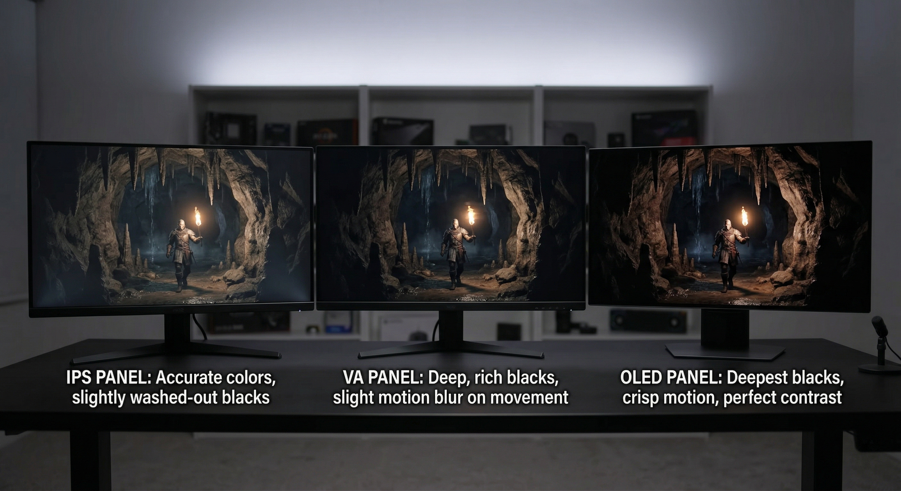
IPS delivers the widest color accuracy and viewing angles with response times fast enough for competitive play (1–4 ms GtG). It is the default recommendation for most gamers. VA offers 3,000:1–5,000:1 contrast ratios versus IPS’s typical 1,000:1, producing deeper blacks for dark-scene games and movies. The trade-off is slower pixel transitions, which can cause smearing in fast motion. OLED combines the color accuracy of IPS with the infinite contrast of self-lit pixels, but carries a burn-in risk with static UI elements and a higher price point.
Quick-pick rule: competitive FPS → fast IPS. Cinematic/horror → VA or OLED. All-rounder → IPS.
What About Response Time and Adaptive Sync?
Monitor makers advertise 1 ms response times, but the measurement method matters. GtG (gray-to-gray) measures how quickly a pixel changes between two mid-tones; MPRT (moving picture response time) measures perceived motion blur. GtG is more relevant for ghosting; MPRT is more relevant for clarity during fast camera panning. A monitor with 1 ms MPRT but 4 ms GtG will still show some ghosting.
Adaptive sync eliminates screen tearing by matching the monitor’s refresh rate to the GPU’s frame output in real time. AMD FreeSync is free and widely supported; Nvidia G-Sync Compatible works on most FreeSync monitors. In 2026, the majority of gaming monitors above 144 Hz support both standards—just confirm compatibility with your GPU brand before buying.
What Size and Curvature Do You Need?
24”–25”: the competitive esports standard. At arm’s length (60–70 cm), you can see the entire screen without head movement.
27”: the all-rounder. Pairs naturally with 1440p at desk distance.
32”: immersive, best with 4K to maintain pixel density.
34”+ ultrawide: a multitasking and gaming hybrid.
49” super ultrawide: niche but unmatched for sim racing and flight sims.
Curved panels (1500R–1800R) reduce peripheral distortion on wide displays. For 27” flat IPS monitors, curvature is unnecessary. For 34”+ ultrawides, a 1500R curve keeps the edges equidistant from your eyes, reducing the need to turn your head.
Which Ports and Extra Features Are Worth Checking?
DisplayPort 1.4 handles 1440p at 240 Hz and 4K at 120 Hz with DSC (Display Stream Compression). HDMI 2.1 is essential if you also game on a PS5 or Xbox Series X at 4K/120 Hz. USB-C with power delivery enables a single-cable laptop setup—video, data, and charging through one connection.
For extras, prioritize an ergonomic stand with height, tilt, and swivel adjustment—it affects daily comfort more than any display spec. Flicker-free backlighting (DC dimming) and low blue light modes reduce eye fatigue during long sessions. HDR10 support is worth having, but true HDR performance requires a peak brightness above 600 nits; anything below that is marketing-grade HDR with minimal visible impact.
Top Picks From NPC Electronics: Gaming Monitors for Every Setup
We reviewed dozens of monitors across price tiers for this guide. One brand that consistently delivered strong value-for-money across categories was NPC Electronics, a display manufacturer based in Guangzhou with over 20 years of production experience. Here are six picks spanning budget to enthusiast:
| Category | Model | Size / Res | Panel | Refresh | Why It Stands Out |
| Budget Gaming | NPC-Mx3208 | 32” / FHD | IPS | 165 Hz | Large screen at entry-level pricing |
| Budget Competitive | NPC-MD2412-K | 23.8” / FHD | IPS | 165 Hz | 97% sRGB, 2 ms GtG, Adaptive Sync |
| Mid-Range Sweet Spot | NPC-WF2433-K4 | 23.8” / QHD | IPS | 240 Hz | 1440p + 240 Hz + FreeSync Premium |
| High-End Performance | NPC-WF2733-K3 Lamp | 27” / QHD | VA | 240 Hz | Deep contrast + RGB ambient lighting |
| Ultrawide | NPC-MU3429-Y | 34” / UWQHD | IPS | 165 Hz | 3440×1440, immersive curve, HDR10 |
| Super Ultrawide | NPC-MU4986B-11 | 49” / DQHD | VA | 240 Hz | 5120×1440, 1500R, 1 ms, HDR10 |
The mid-range pick—the NPC-WF2433-K4—deserves a specific callout. A 23.8-inch IPS panel running at 1440p and 240 Hz with FreeSync Premium and G-Sync compatibility at this price tier is uncommon. It covers competitive shooters and visually demanding RPGs without asking you to choose between resolution and refresh rate.
The Bottom Line
Your three core decisions are resolution, refresh rate, and panel type. Everything else—adaptive sync, curvature, HDR, ergonomics—is about fine-tuning for your specific setup. Match your resolution to your GPU’s output capability, pick a refresh rate your frame rates can actually sustain, and choose a panel type based on the genre you play most. That framework will narrow any list of 200 monitors down to three or four candidates in minutes.
References
[1] Tom’s Hardware. Best Graphics Cards 2026: GPUs for Every Budget. Tom’s Hardware, 2026, tomshardware.com/reviews/best-gpus.
[2] Blur Busters. High Frame Rate Research: From 60 Hz to 360 Hz. Blur Busters, 2024, blurbusters.com/high-framerate-research.
