


What an SPF Record Is and Why It Matters for Email Authentication
The Sender Policy Framework (SPF) serves as a fundamental email verification system aimed at safeguarding domains against impersonation and enhancing the chances of successful email delivery. An SPF record, a particular kind of DNS TXT record, is established within a domain’s DNS zone. This record specifies the authorized IP addresses and mail servers permitted to send emails on behalf of the domain, clarifying which entities can represent the organization in email communications.
In today’s landscape, where phishing and fraudulent activities are rampant, having strong email verification systems like SPF, DKIM (DomainKeys Identified Mail), and DMARC (Domain-based Message Authentication Reporting and Conformance) is essential. By setting up an SPF record, organizations communicate clearly to email service providers such as Google, Microsoft, and Verizon about the legitimate sources (e.g., Google Workspace, Outlook servers, marketing tools) permitted to send emails. If a malicious user attempts to send emails masquerading as your domain, a validation failure related to the SPF record will likely lead to those emails being flagged as spam or outright rejected.
An incorrect or missing SPF record exposes domains to spoofing risks, diminished sender reputation, and possible failures in DMARC compliance. Therefore, regularly reviewing and validating SPF records is not merely advisable but crucial for organizations that prioritize security.
How SPF Record Lookup Works: DNS, TXT Records, and Mail Server Checks
The Role of DNS and TXT Records in SPF Validation
Central to the SPF mechanism is the Domain Name System (DNS), serving as a distributed directory for the internet. To designate which senders are permitted, a domain owner incorporates a TXT record into their DNS setup. This SPF TXT record adheres to a specific SPF format and contains a variety of SPF tags and mechanisms — such as `ip4`, `ip6`, `mx`, `a`, `include`, and `all` — which specify the IP addresses and hostnames authorized to send emails on behalf of the domain.
How Mail Servers Perform SPF Record Checks
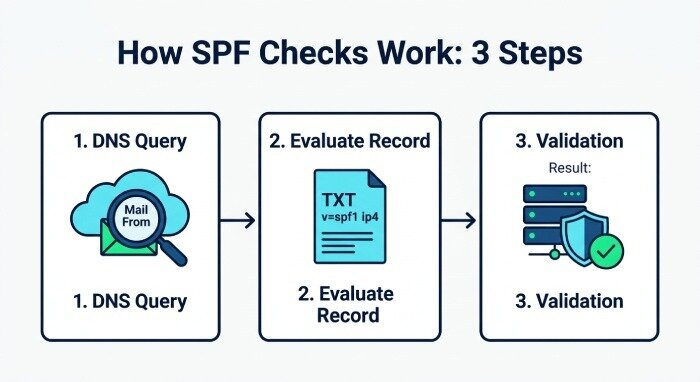
When a mail server gets a new email, it conducts an SPF check in the following manner:
- DNS Query: The server looks up the DNS for the domain indicated in the email’s “Mail From” header to find the relevant SPF TXT record.
- Evaluation of the SPF Record: The server analyzes the SPF syntax, reviewing the tags and mechanisms. It checks whether the IP address of the sender corresponds with the approved IP addresses listed in the SPF record.
- Validation of SPF: If the sender’s IP aligns with the allowed mechanisms (like being specified in an `ip4` tag or corresponding to an MX record), the email successfully passes the SPF check. If not, it may be rejected, categorized as spam, or subjected to further scrutiny.
SPF checks are crucial for enforcing DMARC policies and ensuring compliance with DMARC, supporting other authentication methods such as DKIM.
Step-by-Step Guide to Performing an SPF Record Lookup
A precise SPF record check is essential for identifying email authentication issues and ensuring reliable email delivery. Using AutoSPF simplifies the process by automatically analyzing your SPF configuration, detecting errors, and helping optimize your record for stronger email authentication and improved deliverability.
1. Identify the Domain You Need to Check
Start with the domain you want to examine — this could be yours or one you want to verify. Typical examples are domains that use services like Google (such as `_spf.google.com`) or Microsoft (like `spf.protection.outlook.com`) for sending transactional or marketing emails.
2. Access a Trusted SPF Record Lookup Tool
There are multiple trustworthy tools for conducting SPF checks, such as:
- MXToolbox: A widely-used SPF record lookup utility that also includes detailed reporting and risk evaluation options.
- Easydmarc: Offers an extensive SPF checker along with reporting for DMARC and DKIM.
- Nslookup/Dig Commands: For those who prefer command-line interfaces, running `nslookup -type=TXT yourdomain.com` or `dig txt yourdomain.com` will display all TXT records, SPF included.
3. Analyze the SPF TXT Record
Once you’ve conducted the SPF test with your preferred tool, find the line that starts with `v=spf1`, indicating the version of SPF. Examine the mechanisms listed, which may include:
- `ip4` / `ip6`: Specifies allowed IPv4 or IPv6 addresses
- `a`: Grants permission if the sender’s IP corresponds to the domain’s A record
- `mx`: Incorporates IPs identified as mail exchangers
- `include`: Refers to external SPF records (for example, `_spf.google.com`)
- `all`: Matches any addresses that haven’t been matched so far, usually acting as a fail or softfail indication.
SPF Record Example
This SPF record permits a specific IP address, 192.0.2.1, and refers additional permissions to Google’s SPF settings.
4. Check for SPF Record Exists, Validity, and Errors
An effective SPF diagnostic tool or validator will promptly show the status of an SPF record: it can indicate if the record is present, valid (`SPF record valid`), absent (`SPF record missing`), or has errors (`SPF record error`). Additionally, these tools will point out any syntax issues, excessive DNS lookups, or potentially risky elements (such as the use of `ptr`).
5. Interpret the Diagnostic and Reporting Output
Search for distinct signals such as `SPF record valid`, `SPF record error`, or alerts regarding configuration problems (for example, excessive DNS includes or mechanisms).
How to Interpret SPF Lookup Results and Spot Common Configuration Issues
Effectively understanding SPF check outcomes is crucial for strong email verification.
Understanding SPF Record Status
- Presence of SPF Record: Verifies that a TXT record with SPF format exists for the domain.
- SPF Record Compliance: Signifies that the SPF record is correctly formatted and free from significant errors.
- SPF Record Issues: Problems may arise from incorrect SPF format, exceeding the maximum number of DNS lookups (more than 10), or misuse of mechanisms, such as `ptr` or `redirect`.
- Absence of SPF Record: In the absence of an SPF record, the domain is highly vulnerable to email spoofing and will not pass SPF authentication checks.
- SPF Evaluation Results: Diagnostic tools present these findings along with comprehensive diagnostic trees that illustrate how each mechanism performed or failed.
Common Mistakes and Misconfigurations
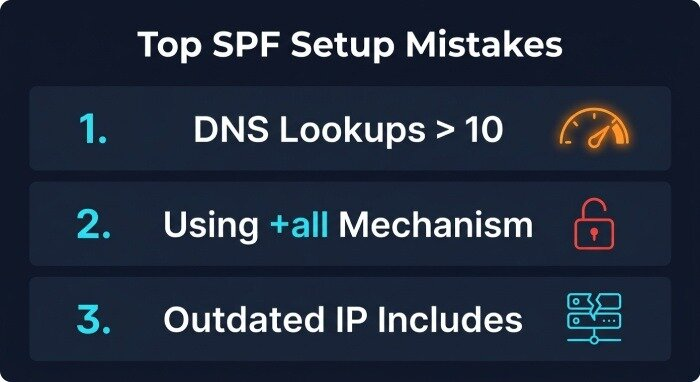
- DNS Lookup Limit Exceeded: SPF checks can handle a maximum of 10 DNS lookups. Excessive use of tags like `include`, `a`, or `mx` can push you over this limit and render your record invalid.
- Misuse of the All Mechanism (`all`): Using `+all` effectively allows any sender, which poses a significant risk. It’s recommended to use `~all` (softfail) or `-all` (fail) depending on your risk management and reporting needs.
- Outdated Includes and Missing IP Addresses: If a service provider changes their sending framework, your SPF record may no longer be valid, leading to failures in SPF checks.
- Caution with PTR Mechanism: Current SPF guidelines discourage the use of `ptr` due to reliability concerns and inefficient DNS lookups.
Utilization of Diagnostic Tools and Reporting
Use sophisticated diagnostic instruments such as the SPF validator offered by MXToolbox or the SPF checking feature from Easydmarc to map out the complete SPF structure, analyze individual components, and get instant notifications regarding any misconfigurations. These resources typically include comprehensive reports and even videos explaining SPF for educational benefits.
Best Practices for Maintaining a Strong, Error-Free SPF Record
An effective implementation of the sender policy framework is vital for both security and achieving maximum email delivery rates. Below are key best practices to consider:
Regular SPF Record Validation and Monitoring
- Streamline SPF Test Processes: Set up regular checks for SPF records with diagnostic tools to identify any unintended misconfigurations or unauthorized alterations.
- SPF and DMARC Monitoring: Combine SPF and DMARC reporting to track the senders of your emails and uncover any unauthorized senders or spoofing activities.
- Update Email Sources Promptly: Quickly adjust the list of IP addresses or external services whenever there are modifications to your email-sending setup.
Maintain Proper SPF Syntax and Adhere to Standards
- Limit DNS Queries: Keep your DNS lookups to a maximum of 10 by merging sending sources, cutting out redundant includes, and avoiding unsupported elements such as `ptr`.
- Evaluate SPF Attributes and Methods: Utilize the designated mechanisms — `ip4`, `ip6`, `a`, `mx`, `include`, `all` — strategically to clearly define your sending sources and eliminate potential confusion.
- Record SPF Modifications: Keep a log of changes made to your SPF record structure and updates, which will aid in assessing risks and responding to incidents.
Coordinate With Complementary Authentication Protocols
- Implement a Robust DMARC Policy: Integrate SPF with DMARC and DKIM to establish a multi-layered defense, ensure comprehensive DMARC compliance, and facilitate precise failure reporting.
- Adhere to Recommendations from Mail Providers: Major ISPs such as Google, Microsoft, and Verizon provide guidelines for optimal SPF and authentication configurations (for instance, use spf.protection.outlook.com for Office365 and _spf.google.com for Workspace).
- Collaborate with Your DNS Registrar or Hosting Service: Utilize their SPF record analysis tools to confirm consistent deployment across your distributed systems.
Ensuring a reliable, accurate SPF record is crucial for protecting your organization’s email reputation and preventing email spoofing. This can be achieved through advanced diagnostic tools, conducting routine SPF record checks, and implementing the aforementioned best practices.
